Saturday, September 12, 2009

Intel Core i5

2009 Intel Core i5 processor logo

As mentioned previously, Intel will be coming out with their new processor (CPU), the Core i5. It is now out, designed to work on desktop boards powered by the equally-new Intel P55 chipset (board controller). These new boards will also work with the new Core i7. But wait, this new Core i7 is not the same as the older Core i7! Confused? Read on.
2009 Intel Core i7 processor logo

This new Core i7 differs from the previous Core i7 in a two ways:
As you can see, the new i7 is the same as the i5, whereas the old i7 works by itself. As also mentioned previously, Intel did this so owners of existing dual-channel DDR3 memory (RAM) on desktop boards powered by the Intel 4-Series chipset (like the P45) wouldn't have to waste their RAM.

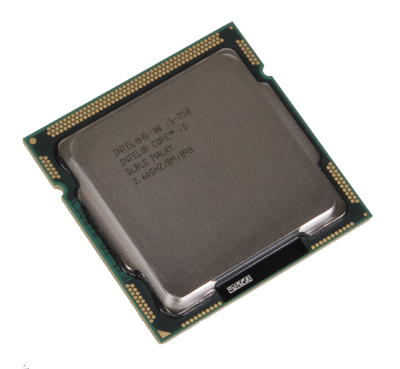
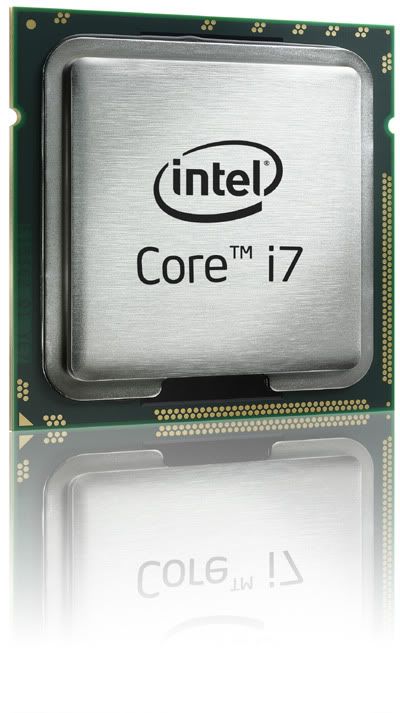
Intel Core i5 processor
The new Intel Core i5 processor. The new Core i7 processor looks just the same too!

Plus, now that you have two CPU types to select from, you have even more choices depending on your needs. But what's the difference between the new i7 and the new i5 then? Hyper-Threading. The new i7 has HT, while the new i5 doesn't have HT. The old i7 has HT too, by the way. As you can see, this makes the CPUs available from high-end (old i7), middle-range (new i7), and mainstream (new i5). But what is HT?
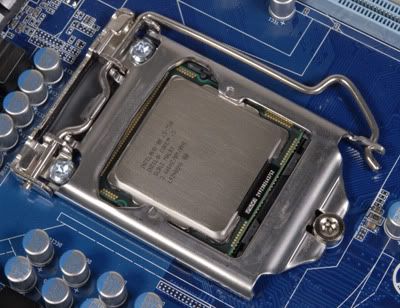
Intel Core i5 processor in LGA 1156 socket on Intel P55 chipset board
The new Intel Core i5 processor in its new LGA 1156 socket on a new Intel P55 board

HT is basically a feature where a single CPU core can function as a quasi dual-core, albeit not as fully-functional as a full-fledged dual-core. So the old i7 and new i7, both being quad-cores with HT, you effectively have quasi octo-cores, while the new i5, being quad-core without HT, is just a quad-core. Again, just to remember, the difference between the old i7 and new i7 is the number of RAM module sticks it supports.
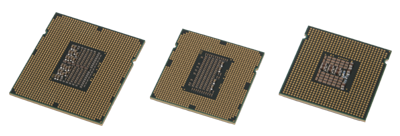
Intel Core i7, Core i5, and Core 2 processors
(left to right) Old i7, i5 (as well as new i7), old Intel Core 2-class

So there you have it. Decide on how much power you need, and then you can go get the right type of CPU to meet your needs. The new i5 with 4 cores and dual RAM, the new i7 with 8 'cores' and dual RAM, or the old i7 with 8 'cores' and triple RAM. New i5 and new i7 need P55 boards, old i7 needs X58 boards.

More Data?

Friday, September 11, 2009

Crash, Boom, Bang?

Microsoft Bing

If you haven't heard by now, Microsoft has re-named its Web search engine from Live Search to Bing, in an attempt to make it more "user-friendly". However, this "new" search engine got into a little trouble recently when it was found to be selective of the type of results to show depending on the search being queried. Want to know more?

In particular, it was sensitive towards searches that would highlight the "bad" side of Microsoft. This came to be known via here, and a screen capture here proved the point, especially since it has now been changed to reflect no "censorship", as seen from here. Just to be fair, Google was put to the test as well, as seen here. Well, it's good to see Microsoft redeem itself than to deny!

More Data?

Friday, September 4, 2009

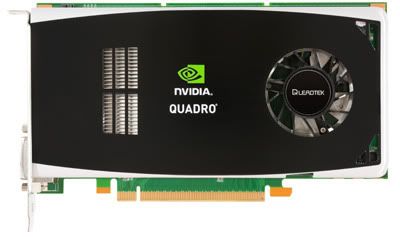
Leadtek Quadro FX 1800 Review (Part 1)


Few weeks ago we mentioned here that we'll be coming out with a review on the Leadtek Quadro FX 1800 video card, designed for professional usage on workstation computers. Now we follow up with the Quadro's performance. If you need a primer about this, we suggest you read our initial post to get a better basic understanding before we proceed further in the tests.

As mentioned before, a Quadro is different from a GeForce, which is designed for gaming in mind, but this isn't so apparent when the price of a Quadro is higher than a GeForce. For comparison sake, let's take the most powerful single-GPU GeForce out there, the 285. Based on Google Product Search, we can see the GeForce 285 costs around USD300, while the Quadro FX 1800 costs about USD400. So what do you get extra or better for the higher costs it asks?

Bandwidth

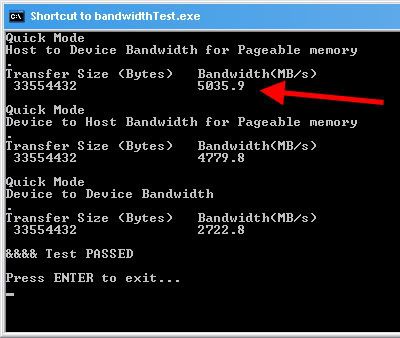
Let's start with something simple - the bandwidth. The slot that the Quadro sits in, PCI Express 2.0 interface, supports up to 5GBps (the older PCI Express 1.0 slot only supported up to 2.5GBps).


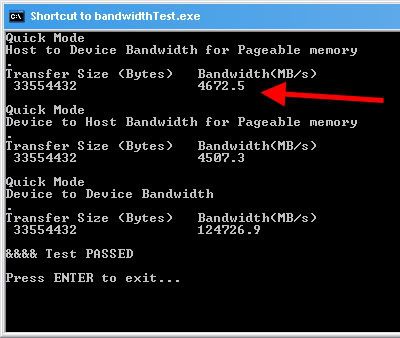
Quadro makes full use of this PCIe 2.0 slot by hitting the 5GBps limit (red arrow above), while the GeForce 285 only uses up to 4.6GBps (red arrow below) of the slot's 5GBps limit.


You might ask - "Wait! What's that 12GBps in the 285 under Device to Device Bandwidth, where the Quadro only got 2GBps?" Good question! That's the internal bandwidth on the card itself, not between the card and the mainboard.

A GeForce needs this speed because in games, it's all about fast scenes so the GeForce has to process things quickly inside the card. In Quadro however, the card needs to quickly update the display during complex 3D work, so it needs to get back to the user faster - hence the faster bandwidth between the card and the computer.

That doesn't make any sense? Think of it this way - when you're playing a game, you're moving about in a 3D world, the card has to visualise this world as you move so it needs to quickly do "behind the scenes work", basically processing the scene ON the card.

Now when you're doing 3D work, you're manipulating a 3D scene, so the card needs to update the object fast - this means it has to continuously feedback 3D objects to the user manipulating it. Let's move on.

2D Wireframe @ 3D Programs

Performance Test is a tool that comes with Intel X58 Desktop Boards, designed for the Intel Core i7 quad-core desktop processor with integrated triple-channel DDR3 memory controller. Intel bundles the full version 6.1, although PassMark (which makes Performance Test) now has version 7.

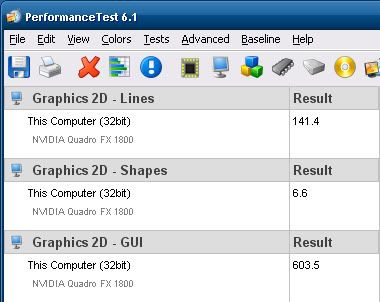
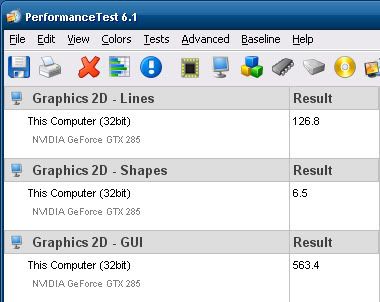
PT 6.1 shows that the Quadro performs better for 2D Graphic Lines and Shapes, as well as 2D GUI (Graphical User Interface). This is exactly what Quadro is designed for in 3D work.


That doesn't make sense either? Think of it this way - while you're working with 3D objects, the wireframe of these objects are basically 2D lines making up the 3D object. Now onto it in action.

For this, we'll need a real-world scenario the Quadro card is designed for - a 3D program. While there are many options out there, with AutoDesk's Maya being the leader, it also costs around USD3,500. So let's turn to the most popular Open Source (free) 3D program currently - Blender.

To see Quadro at work, we'll need to load a 3D model into the program. Like 3D programs, most models aren't free either, but since Blender is free, there are some free Blender models out there. To stress the Quadro, we'll use a complex 20MB 3D model by Dennis Bailey and Eric M Clark of the fictional starship Enterprise from the science-fiction franchise Star Trek.

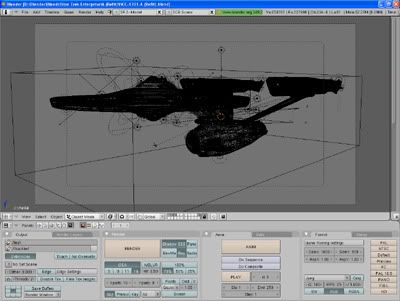
This is how it looks like once you've opened the Blender model file (called Blends) in Blender:


If you render the 3D model, it will look like this:


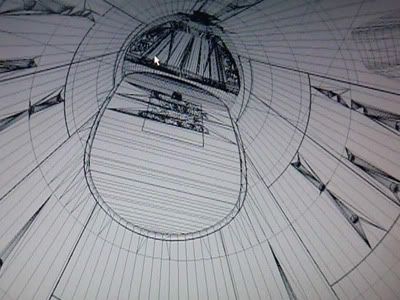
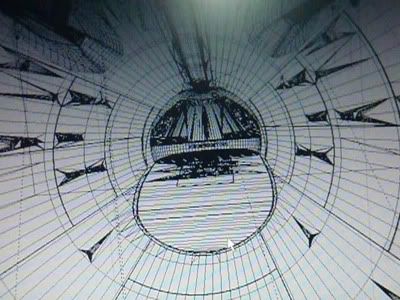
Now to see Quadro at work, you've got to see how Quadro renders 2D lines in a working environment, in this case, while you're manipulating a model. To show you this, we have to record a video of the model being manipulated, and we took a snapshot of the video during it too:


This is the Quadro FX 1800.


This is the GeForce GTX 285.

Here are the videos of each card using Blender so you can see for yourself what we mean. Feel free to pause these videos at the above screen capture image positions to see it for yourself. It is advisable to toggle the HQ (High Quality) button in these YouTube videos to see it clearer.

Quadro FX 1800


GeForce GTX 285


Memory Advantage

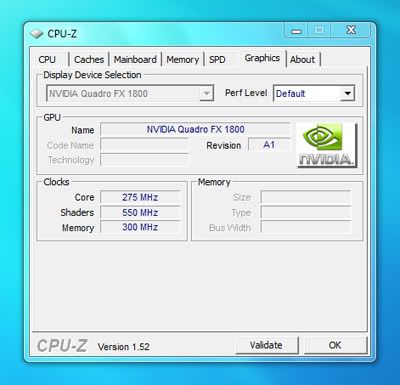
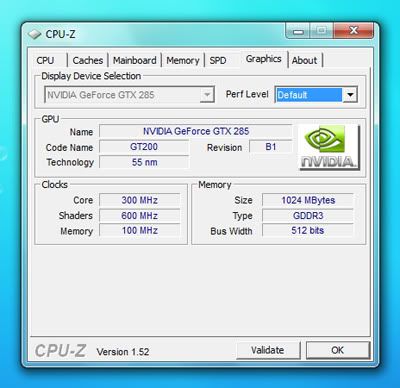
As you can see, Quadro does a very fine job (literally) to render accurate and precise 2D lines when you manipulate a 3D object in a 3D program, giving you exactly what you need, something which GeForce cannot deliver with its blurry and jagged 2D lines. This is also due to the faster memory the Quadro has which the GeForce lacks, as seen in these below shots of CPU-Z:


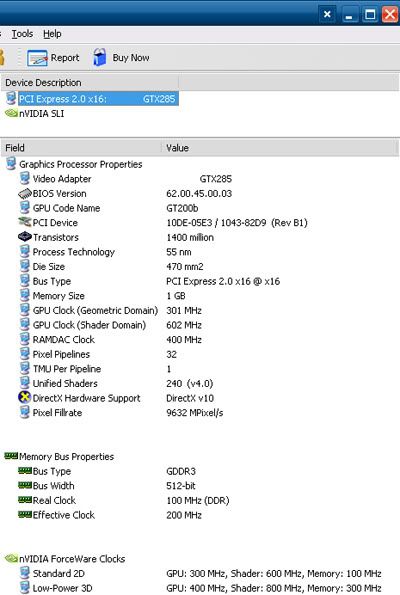
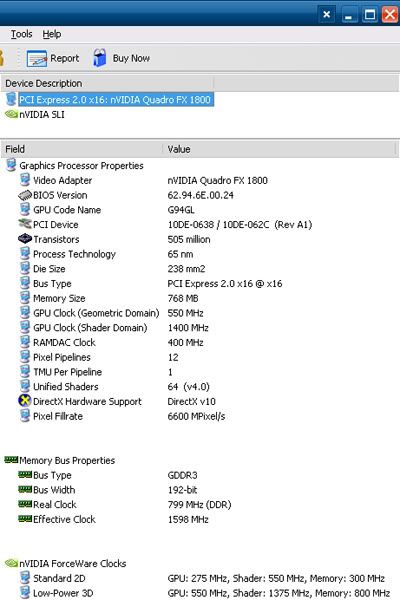
The GeForce GTX 285 has faster Core and Shader, but a slower Memory Clock than the Quadro FX 1800. This is also mirrored in Everest (formerly AIDA), an information tool:


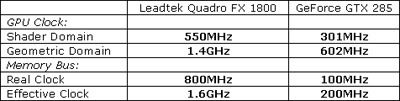
There're also some other details there, like a faster Shader and Geometric Domain GPU Clock in the Quadro FX 1800 (550MHz and 1.4GHz) versus the GeForce GTX 285's 301MHz and 602MHz under Graphics Processor Properties.

Then under Memory Bus Properties, you'll find the Quadro's 800MHz Real Clock triumphing the GeForce's 100MHz while the Quadro's Effective Clock is 1.6GHz versus the GeForce's 200MHz. In summary:


Now do you begin to see what the extra USD100 is worth compared to the the most powerful gaming GPU? Next week we'll continue the review with Quadro's differences in Heat, Energy, and Power usage. Then we'll show you how the Quadro can also handle same games on the side!

More Data?

Wednesday, August 26, 2009

PC and Windows 7 Cookies

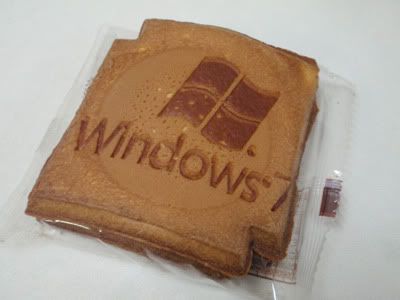
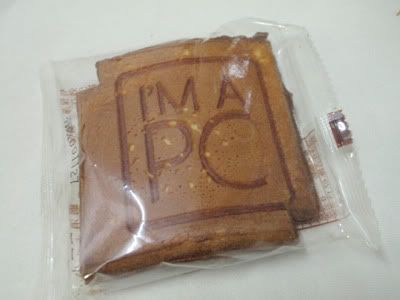
At BrickTech, we're about LEGO® and tech, but sometimes we're willing to make an exception when something fun crops up, since LEGO is all about fun too! We're talking about Windows 7 and Microsoft's "I'm A PC" cookies - and this isn't about the term cookies used in Web Browsers!

Windows 7 cookie

These are Fried Cookies, so they taste like Fortune Cookies or a thicker version of Love Letters. Interested to find out who made them?

PC cookie

They were specially made by Taiwan's Kobayashi Cookie Factory at XLCookie.com (Chinese only) . If you can find these cookies on their online shop, go ahead and order them to 'taste' Windows 7!

You can see another picture of this Windows 7 cookie on Bianca Wong Pi Chin's Flickr here.

More Data?

Friday, August 21, 2009

640Kbps Should Be Enough For Everyone

The following comic is based on a true story

BrickTech 006 - Streamyx

There is only a handful of people who know about this event which transpired, and we're happy to let you know that BrickTech is one of them :) As to who and what this refers to, we'll leave you to figure that one out ;) Rest assured, we swear upon our LEGO® plastic miniature figurines, it's the whole truth and nothing but the truth. Sometimes fact IS stranger than fiction.

By the way, if you didn't catch the relevance of this post's title, then you're not as old as us :P

More Data?

Wednesday, August 12, 2009

Dual-Channel Core i7


The Intel Core i7 quad-core desktop processor will soon also come in a version with integrated dual-channel DDR3 memory controller

Don't do a double-take. You read that right. Intel Core i7 quad-core desktop processor with Dual-Channel integrated memory controller, not Triple-Channel. For those who know the Core i7, you'll know it supports triple memory modules, so to go backwards and support dual memory modules is a shocker! So why is Intel doing this?

Because the Core i5 desktop processors will be coming out, which comes with an integrated dual-channel memory controller, so offering the Core i7 with the same feature allows users to select from the middle-range Core i5 or the high-end Core i7 while keeping their current dual memory modules from the previous Core 2-class of desktop processors. Want to know more?

By the way, this is of course, assuming you were using DDR3 memory and not DDR2, as some previous desktop boards which supported the Core 2-class of desktop processors only supported DDR2 memory. If that's the case then you can also consider going for the triple-channel Core i7 since you'll be upgrading your memory anyway! This new dual-channel Core i7 is designed for users who already are using DDR3 memory, but want more power than the Core i5.

So what happens to the triple-channel Core i7? It will still be there as a top-end quad-core desktop processor, and for those who are willing to buy new triple memory modules, as well as need more memory, specifically if they're using an x64 (64-bit) operating system, which can use beyond 4GB of memory.

How would you know the difference then between a dual- and triple-channel Core i7? The triple-channel still maintains the LGA1366 processor socket while the new dual-channel Core i7 and i5 (as well as entry-level dual-core i3) will use the LGA1156 processor socket instead. That's right, there'll also be a Core i3 dual-core entry-level desktop processor for those who don't even need the power of the Core i5.

The new LGA1156 processors will be supported by desktop boards powered with Intel's P55 board controller (chipset), while the LGA1366 Core i7 processor will continue to be supported by Intel's X58 chipset. That's not the end of the Core i7 triple-channel class processors though. Intel will also release the Core i9, a six-core desktop processor for the Core i7 platform.

Stay tuned for more updates about these new processors if you're confused about them.

More Data?

Internet Censorship

Internet Censorship

Those who have observed Malaysia's 12th General Election on 8th March 2008 will have noticed the Opposition won 5 states from the dominant Government via the Internet, which the Govt had little control over while they were controlling the mass media.

This was even mentioned by Vinton Cerf, Father of the Internet @ WCIT 2008 - which you can read more about him here in our previous post (at the bottom of that post). He mentioned about how the Internet has shown it plays an important role in politics, and it has even resulted in the world's first blogger to be voted into Parliament, which is Malaysia's case, is Jeff Ooi. So what has the Gov tried to do? Read on for more.

As a result, in order to work towards securing the 13th GE in 2012 from being lost, the Govt has begun to blog like the Opposition, and has recently decided to attempt to filter the Internet, just as how China tried with their Green Dam project.

However, as Jack of BrickGamers have said, if even the Middle Kingdom can give up (at least for now), perhaps it's futile for the Govt here to consider pursuing this when it actually contradicts the MSC (Multimedia Super Corridor) Bill of Guarantees, which prohibits Internet censorship to encourage foreign investments in the country.

So far the Govt has said the filter is only to censor pornography, but we all know power can be abused in the wrong hands once laws are laid down, and in anycase, it still violates the MSC's Bill.

More Data?
Friday, July 31, 2009

NVIDIA CUDA

NVIDIA CUDA GPGPU technology logo

What is NVIDIA CUDA? If you've read our previous post here, you'll get a brief understanding of CUDA, which is basically NVIDIA's implementation of GPGPU technology by supporting programs (and games) designed to take advantage of CUDA. GPGPU is explained below.

CUDA is found on GeForce 8 series of 3D gaming and multimedia graphics card and above - as well as Quadro FX professional workstation video cards. This is possible because since GeForce 8, as well as the new Quadro, the design of the graphics processor (the GPU) on the card has changed. In fact, it's more like a CPU (the processor on the mainboard) now. Hence what you have is a GPU that functions like a CPU, and is known as GPGPU. But how did this come about and why? Read on.

In the past, GPUs work in seperate processing methods - one part of the GPU will do the processing of the 3D structure, while the other part will then process the image on the structure - think of it like how when you construct a building you first have to build the framework before you can install the windows and floors.

That worked fine for awhile, until 3D games began to get more demanding and this was a poor allocation of GPU resources - what happens if you had more structures to show but less textures and surfaces? Or the other way around? Hence the birth of the new GPU known as Unified Shader Architecture, which combines the mini processes inside the GPU into a single block which can process anything given to it dynamically. So what you have now is one large processor.

So since you have a CPU in a GPU, now you can also use it for processing programs asides from just processing 3D graphics in games (or processing 3D scenes for Quadro cards). In comes CUDA which allows this since the GPU is still not a full CPU so you need an interface medium.

What can CUDA do? Basically anything that a CPU can do - except programs have to be made to take advantage of CUDA for this to happen, so that will take time. Some of the early programs include video conversion tools.

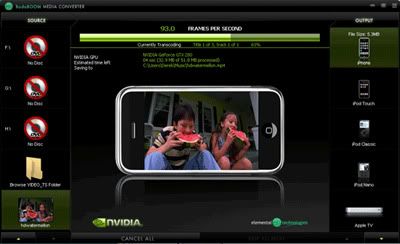
BadaBoom CUDA media converter
BadaBoom Media Converter using NVIDIA CUDA GPGPU technology

This converting (transcoding) process takes up time and if you were to run it on your CPU, not only will you won't be able to do other tasks on your computer because your CPU is busy with the process, it will also be slower since CUDA is a newer technology which can be done from scratch to be optimised faster. One such CUDA transcoder is BadaBoom.

Photoshop plugin
An image filter plugin in Adobe Photoshop

Then there's also the ability to use CUDA for image processing, like running plugin filters in Adobe's Photoshop. Again, this takes time on the CPU so for large images, it will be faster on CUDA. You can also use CUDA for games. That's where Microsoft's Windows DirectX 11's Compute Shader comes in, found in Windows 7. But we'll leave that for another post.

More Data?