Showing posts with label review. Show all posts

Monday, September 14, 2009

Leadtek Quadro FX 1800 Review (Part 2)


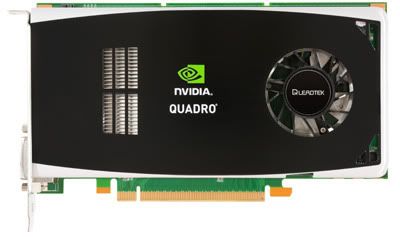
Quadro FX 1800 - a professional workstation video card

Slightly over a week ago we showed you Part 1 of the Leadtek Quadro FX 1800 video card review here, now we'll continue with Part 2. If you haven't read Part 1, we suggest you do, and if you have no idea what Quadro is (compared the the more popular GeForce), then we suggest you read the primer which is mentioned in Part 1, and where to look for it. Now let's continue!

Energy


It's a small world after all...

Energy is a big issue in today's world. From global warming to climate change and fossil fuels and green alternatives, energy efficiency is a important element for our current state of survival if we're to go further without screwing up the planet even more - conspiracy theories aside about how the greenhouse effect is just a phase of the Earth. So it comes no surprise that today's electronic devices focus heavily on their power consumption and the Quadro is no different.

Unlike the GeForce, which is designed for 3D games and thus won't be taxed at it's full potential for hours (unless perhaps inside a cyber-cafe!), the Quadro might be used for hours on an end, especially since it's designed for work while the GeForce is for play. Think about it - what do you spend more time on? Working or playing? Well if you're a professional gamer it's out of the question!
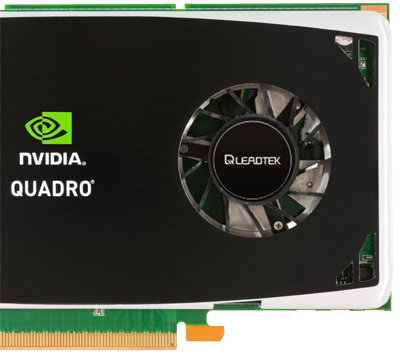

Look! No power ports!

So it becomes obvious that the Quadro needs to factor in electricity savings as well and boy does it! At first glance you'll notice the Leadtek Quadro FX 1800 does not have any PCI Express pin power requirement at all! On the other hand, the GeForce GTX 285 needs a whopping dual 6-pin PCIe power plugs from your PSU (Power Supply Unit)! Keep in mind only high-end PSUs above 600-Watts or so MAY have dual PCIe power connectors so you may also have to buy a new PSU if you're using the GeForce 285!
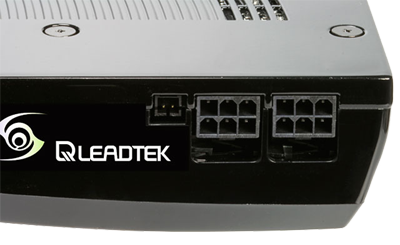

You'll need DUAL 6-pin PCI Express power plugs from your PSU!

So how much power DOES the 285 consume as compared to the energy-efficient Leadtek Quadro FX 1800? To measure this, we'll need to use what's called a Plug-In Power Monitor, which basically shows how much electricity (measured in Watts) is being drawn from the electrical socket to be used by the computer which is having the respective card installed in it.
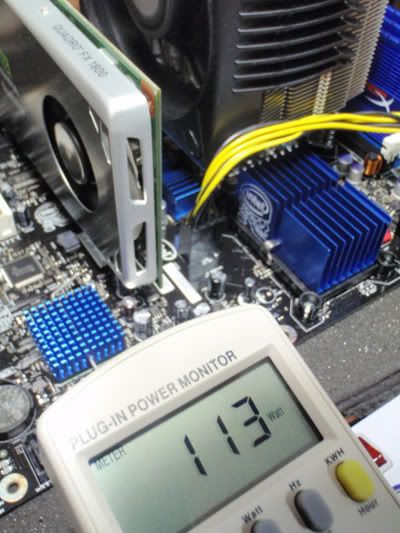

The Leadtek Quadro FX 1800 on our Intel Core i7 (Nehalem) Platform
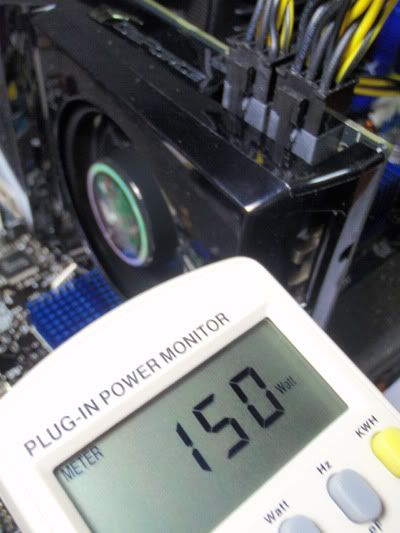

The GeForce GTX 285 on our same Intel Core i7 (Nehalem) Platform

37Watts more while running - and that's only idle! So you can imagine what happens during intense full usage like being taxed by 3D processing! Now multiply that by the minutes, hours, days, weeks and months you'll be using a 285 as compared to this Leadtek Quadro FX 1800 and you'll soon be running up a huge bill that you could save were you running the Quadro instead!

Here's the YouTube videos from BrickGamers Channel where you can see the power difference when the Leadtek FX 1800 and 285 powers up. Both are running on the same platform, so the differences you see in Watts being consumed shows directly how much is used:

Leadtek Quadro FX 1800 @ Nehalem Platform


GeForce GTX 285 @ Nehalem Platform


Thermals

The side-effect of energy is heat and once again this can be seen in the Leadtek Quadro FX 1800 as compared to the 285. Notice how much cooler the 1800 runs compared to the 285:
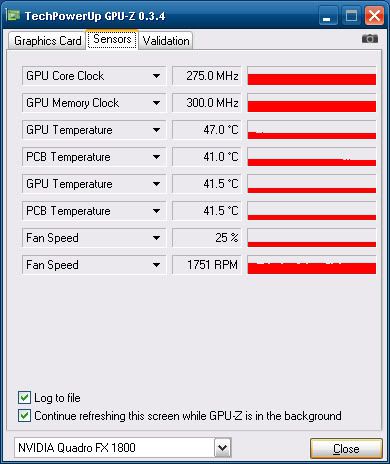
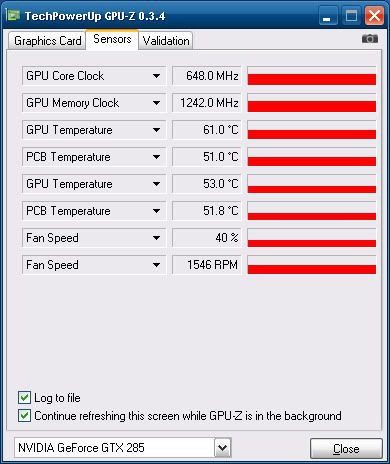


Extra power consumption aside, all these extra heat also spells cooling, which means you need to spend more power to not only cool the card, but also the insides of your computer casing, to prevent other components from heating up and overall slowing down your whole machine. So what you have here is both extra power consumption in terms of running the 285 as well as cooling it. This is yet another aspect where the Quadro shines in and is worth that extra cost.

Part 3 we'll look at the gaming aspects of the Quadro FX 1800. While it's not a gaming card, it's good to see just how much it can do so you do get to also play some games on it after working!

More Data?

Friday, September 4, 2009

Leadtek Quadro FX 1800 Review (Part 1)


Few weeks ago we mentioned here that we'll be coming out with a review on the Leadtek Quadro FX 1800 video card, designed for professional usage on workstation computers. Now we follow up with the Quadro's performance. If you need a primer about this, we suggest you read our initial post to get a better basic understanding before we proceed further in the tests.

As mentioned before, a Quadro is different from a GeForce, which is designed for gaming in mind, but this isn't so apparent when the price of a Quadro is higher than a GeForce. For comparison sake, let's take the most powerful single-GPU GeForce out there, the 285. Based on Google Product Search, we can see the GeForce 285 costs around USD300, while the Quadro FX 1800 costs about USD400. So what do you get extra or better for the higher costs it asks?

Bandwidth

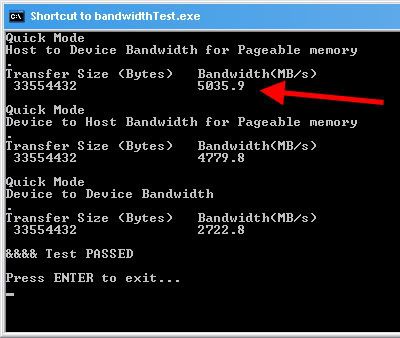
Let's start with something simple - the bandwidth. The slot that the Quadro sits in, PCI Express 2.0 interface, supports up to 5GBps (the older PCI Express 1.0 slot only supported up to 2.5GBps).


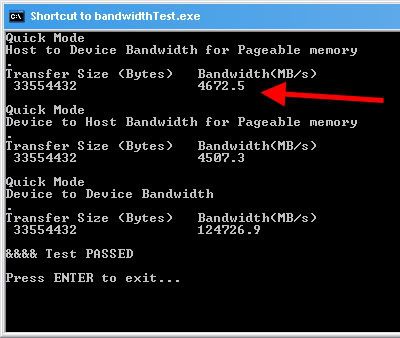
Quadro makes full use of this PCIe 2.0 slot by hitting the 5GBps limit (red arrow above), while the GeForce 285 only uses up to 4.6GBps (red arrow below) of the slot's 5GBps limit.


You might ask - "Wait! What's that 12GBps in the 285 under Device to Device Bandwidth, where the Quadro only got 2GBps?" Good question! That's the internal bandwidth on the card itself, not between the card and the mainboard.

A GeForce needs this speed because in games, it's all about fast scenes so the GeForce has to process things quickly inside the card. In Quadro however, the card needs to quickly update the display during complex 3D work, so it needs to get back to the user faster - hence the faster bandwidth between the card and the computer.

That doesn't make any sense? Think of it this way - when you're playing a game, you're moving about in a 3D world, the card has to visualise this world as you move so it needs to quickly do "behind the scenes work", basically processing the scene ON the card.

Now when you're doing 3D work, you're manipulating a 3D scene, so the card needs to update the object fast - this means it has to continuously feedback 3D objects to the user manipulating it. Let's move on.

2D Wireframe @ 3D Programs

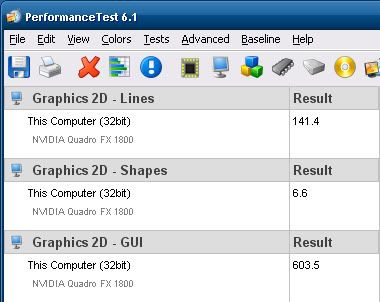
Performance Test is a tool that comes with Intel X58 Desktop Boards, designed for the Intel Core i7 quad-core desktop processor with integrated triple-channel DDR3 memory controller. Intel bundles the full version 6.1, although PassMark (which makes Performance Test) now has version 7.

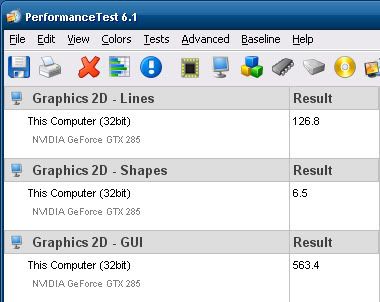
PT 6.1 shows that the Quadro performs better for 2D Graphic Lines and Shapes, as well as 2D GUI (Graphical User Interface). This is exactly what Quadro is designed for in 3D work.


That doesn't make sense either? Think of it this way - while you're working with 3D objects, the wireframe of these objects are basically 2D lines making up the 3D object. Now onto it in action.

For this, we'll need a real-world scenario the Quadro card is designed for - a 3D program. While there are many options out there, with AutoDesk's Maya being the leader, it also costs around USD3,500. So let's turn to the most popular Open Source (free) 3D program currently - Blender.

To see Quadro at work, we'll need to load a 3D model into the program. Like 3D programs, most models aren't free either, but since Blender is free, there are some free Blender models out there. To stress the Quadro, we'll use a complex 20MB 3D model by Dennis Bailey and Eric M Clark of the fictional starship Enterprise from the science-fiction franchise Star Trek.

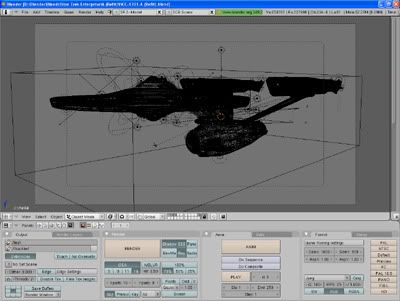
This is how it looks like once you've opened the Blender model file (called Blends) in Blender:


If you render the 3D model, it will look like this:


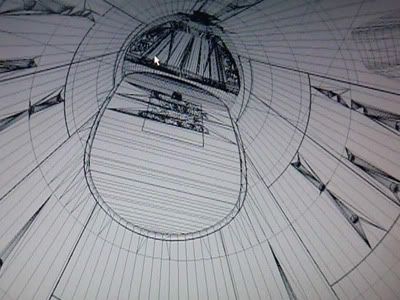
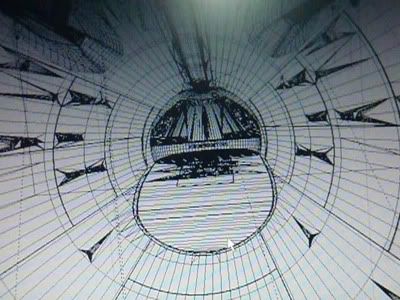
Now to see Quadro at work, you've got to see how Quadro renders 2D lines in a working environment, in this case, while you're manipulating a model. To show you this, we have to record a video of the model being manipulated, and we took a snapshot of the video during it too:


This is the Quadro FX 1800.


This is the GeForce GTX 285.

Here are the videos of each card using Blender so you can see for yourself what we mean. Feel free to pause these videos at the above screen capture image positions to see it for yourself. It is advisable to toggle the HQ (High Quality) button in these YouTube videos to see it clearer.

Quadro FX 1800


GeForce GTX 285


Memory Advantage

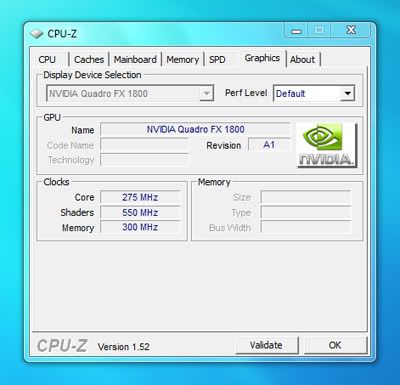
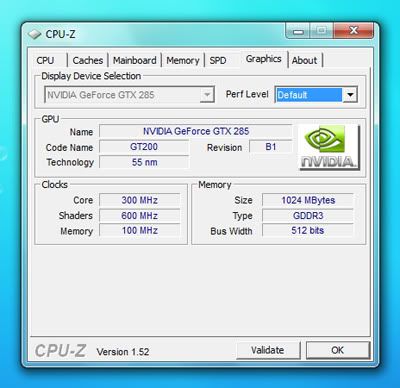
As you can see, Quadro does a very fine job (literally) to render accurate and precise 2D lines when you manipulate a 3D object in a 3D program, giving you exactly what you need, something which GeForce cannot deliver with its blurry and jagged 2D lines. This is also due to the faster memory the Quadro has which the GeForce lacks, as seen in these below shots of CPU-Z:


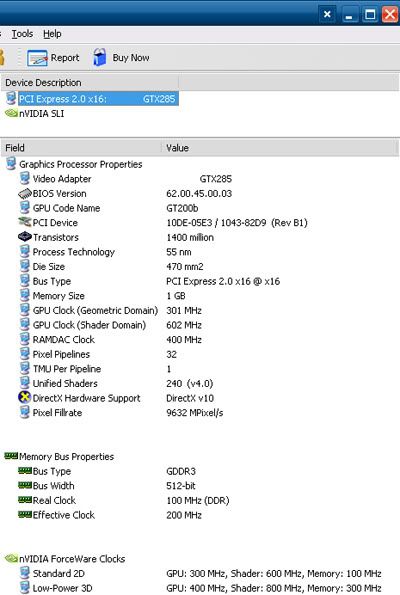
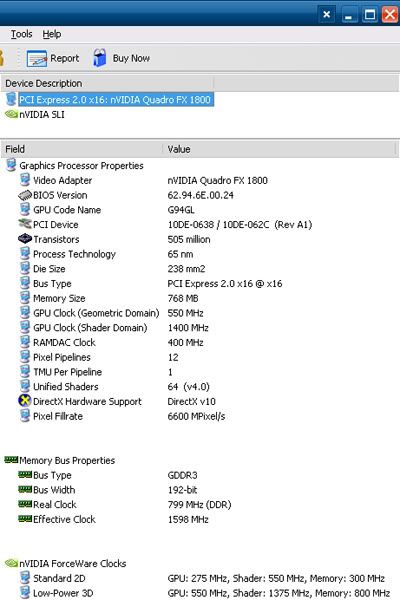
The GeForce GTX 285 has faster Core and Shader, but a slower Memory Clock than the Quadro FX 1800. This is also mirrored in Everest (formerly AIDA), an information tool:


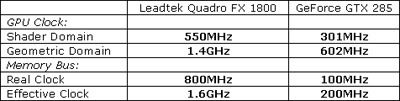
There're also some other details there, like a faster Shader and Geometric Domain GPU Clock in the Quadro FX 1800 (550MHz and 1.4GHz) versus the GeForce GTX 285's 301MHz and 602MHz under Graphics Processor Properties.

Then under Memory Bus Properties, you'll find the Quadro's 800MHz Real Clock triumphing the GeForce's 100MHz while the Quadro's Effective Clock is 1.6GHz versus the GeForce's 200MHz. In summary:


Now do you begin to see what the extra USD100 is worth compared to the the most powerful gaming GPU? Next week we'll continue the review with Quadro's differences in Heat, Energy, and Power usage. Then we'll show you how the Quadro can also handle same games on the side!

More Data?