Showing posts with label windows. Show all posts

Tuesday, July 14, 2009

x86 (32-bit) and 4GB of Memory


This might be something you already know - or don't. x86 (32-bit) computer systems can only recognise up to 4GB of total memory - regardless of what type of memory. This includes the DDR1, 2, or 3 memory modules slotted on your board inside the computer casing, as well as the memory (usually GDDR3, 4, or 5) that comes with your graphic card (which contains the GPU or Graphics Processing Unit) - if you have one installed.

Some boards come with integrated GPU so the memory is shared from the main installed modules. For these, there is no need to take the graphic card memory into consideration. But what if you have a graphic card?

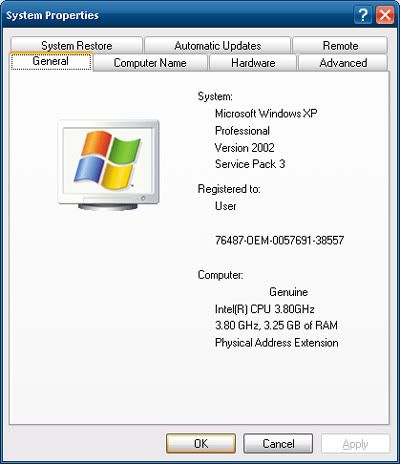
If you have a graphic card, and say it comes with 512MB of memory, plus you have 4GB of memory sticks installed on your board, you will only be able to use about 3.5GB of memory because the other 512MB has to be allocated for the processor to access on the graphic card. This is a limitation of x86 design.

To circumvent this problem you have to move to x64 (64-bit), which means you have to install an x64 operating system (OS), like Windows XP 64 (rare), Windows Vista 64, or the upcoming Windows 7 64 - currently available as a freely-downloadable RC (Release Candidate) version from Microsoft's site here.

Keep in mind to use an x64 OS, your processor needs to be able to support x64 as well - check Intel or AMD's site (depending on which brand of processor you have) to see, or see here to see what processors support x86 and x64 OSes.

There is one caveat to using an x64 OS however - only x86 software can run on it (this backwards compatibility is included), and this means there can be no legacy 16-bit code in the x86 software, which can sometimes happen to older hardware which have outdated software.

x64 also means you can go beyond 4GB of board memory - so feel free to install more up to how much your board supports and if you can afford it. Having more memory means you can have more things open on your desktop without having to close something to free up memory for something else to open.

Keep in mind memory on the board and memory in the form of hard drive storage is 2 very different things. The board memory dictates how much you can open on your desktop at any one time while your drive storage dictates how much you can keep on your computer. There is a dual-stage of storage and usage going on between drive and memory so they're not the same.

More Data?

Tuesday, July 7, 2009

Sun Virtual Box 3 for 3D

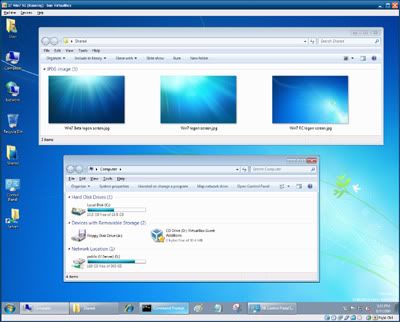
Sun Virtual Box 3 Windows 7 RC
That's Windows 7 RC running in Sun's Virtual Box 3 window (on a Windows XP desktop)

If you've read this post before (scroll down to the bottom of it), you'll know about Sun's Virtual Box (VB), a virtualisation software like Microsoft's Virtual PC 6 (VPC6), which is designed for Windows XP and Windows Vista.

Virtual PC 7 (VPC7) is designed for Windows 7, but unlike VPC6, VPC7 is designed to work transparently on Win7 as a compatibility feature for Windows XP software, hence it's known as "XP Mode". If VM (Virtual Machine) software sounds familiar, you might have heard of VMware before. But what's the difference?

VB differs from the popular VMware by being free, and it differs from MS VPC6 by emulating better computer hardware (since it's newer), and like VPC7, it offers a "Seamless Mode", where you can hide the virtual desktop running in VB and use the virtual windows with your actual operating system (OS). VMware calls this the "Unity Mode".

Anyway, since VPC7 only works on Win7 and only runs XP, this makes VB an attractive option if you're running XP, Vista, Mac or Linux, and if you want to run virtual Vista, Linux, etc.

Additionally, VP7 requires your processor to support hardware virtualisation (known as VT in Intel and V in AMD). If you have an Intel Core i-class or an AMD Athlon-class or AMD Phenom-class processor, it's ready. If it's an Intel Core 2-class or Intel Pentium 4-class processor, it may or may not. Check the Intel Archive Site here to see the list.

Moving on, in our previous VB post, we talked about using VB2 to sample Win7 RC (Release Candidate) instead of installing 7RC on your computer. However, VB2 suffers from one major flaw - while it emulates newer hardware than VPC6 which uses older hardware, it doesn't support 3D, in the form of Microsoft's Direct 3D - the most important component in DirectX for Windows, and OpenGL (Graphics Library), used in Mac and Linux.

VB3 solves that by including 3D support - albeit it's experimental. With VB3, you can now take full advantage of the newer emulated hardware - just like how VB2 did, except now you have 3D.

In our following post, we'll show you how to use these free VM software. In the meantime, feel free to play around with them. Remember, they're virtual. So whatever happens in them happens in the virtual OS - NOT the OS which these VM software runs on. So relax. You're safe.

This also means you don't have to bother with anti-virus or almost any forms of security. Hence why most anti-virus won't even work in a virtual OS. Which means using a virtual OS is a very secure way to experiment with any dangerous software which might otherwise wreak havoc on your actual OS. Using virtualisation is a good way to visit unknown sites which might otherwise harm your computer with your actual OS. However keep in mind you can share files between the virtual OS and your actual OS so make sure your actual OS has an updated anti-virus! We'll show you how to share files between the virtual (guest) OS and your actual (host) OS next time.

Free Virtualisation Software Download Links:
* Virtual PC 7 requires 2 install steps - the VPC7, followed by a virtual XP image (included)

More Data?

Friday, June 26, 2009

Michael Jackson @ Web 2.0

Michael Jackson

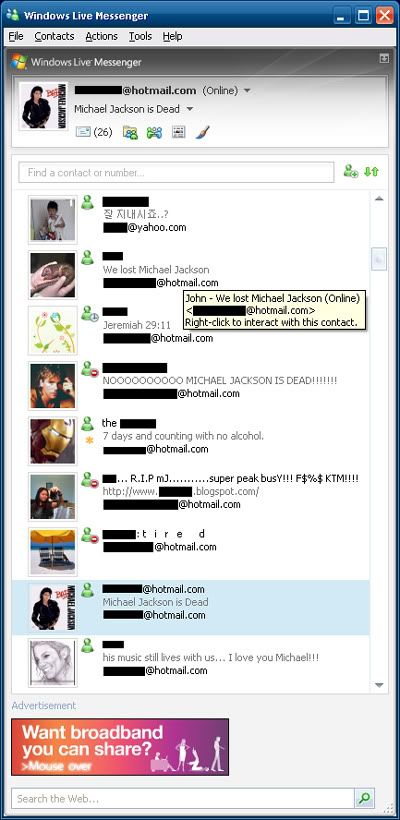
By now most of you would have heard about the demise of Michael Jackson, the King of Pop, and an iconic idol of the 80's. Whether or not you like or loathe MJ is out of the question - some might sigh relief - others will cry in agony. Though it's uncanny he died before his final concert.

What's interesting in how today's world shares news compared to the past. Today we embrace the Web 2.0 in a multitude of forms - from IMs (Instant Messengers) to Social Networking sites, like FaceBook (FB). People don't really call or SMS each other - we post up messages on our IMs and FB. In today's always-connected world via the Internet, the Web 2.0 is the medium of communication. Want to know more about IMs?

Chances are you already use a form of IM, and chances are it's a deritive of MSN (Microsoft Network) Messenger, which today is known as Windows Live Messenger. MSN ended with version 7.5, but a 7.0 version was made for those who did not want to switch to MSN 8.0, which is also known as WLM 8.0.

WLM 8.0 isn't available anymore, as it's been replaced with WLM 8.1, which offers offline messages, a very handy feature. As you can't use MSN 7.5 anymore, you have to switch to WLM 8.1 or MSN 7.0 - you don't have to use WLM 8.5.

WLM 8.5 doesn't really introduce anything substantial, so you can give it a pass, unless you want all the other features that comes with Windows Live Services, such as Windows Live Mail 12 (2008) which replaces Outlook Express. There's also WLM 14 (2009), which is version such to tie in with Windows Live Mail 14 (2009).

Again, you don't need the latest version of an IM unless you're required to do so in order to go online. Newer IMs are more demanding on hardware due to the features included, so unless you have a new computer, it's best to stick to something that works on an older computer.

So how will the future generation of a future King of ..... spread and share news? Via Singularity?

More Data?