Thursday, March 11, 2010

Microsoft Malaysia - TechNation - ELITE - Windows Day - Gaming @ 7


BrickGamers, BrickTech's main site, focuses on games (duh!) but when it comes to technology - since modern games leverage heavily on it - that's where BT comes in.


Recently, there was a talk held called Windows Day @ Microsoft Malaysia Headquarters @ the Petronas Twin Towers @ KLCC (Kuala Lumpur City Centre).


It was organised by the Microsoft Malaysia NGO (Non-Governmental Organisation) TechNation, under which ELITE (Extraordinary League of Information Technology Experts) is found, supporting Microsoft's infrastructure software - Windows, Office, Server, ForeFront (Security) - with events held to speak about relevant topics based on certain themes - Server Day, Security Day, Office Day, and of course, Windows Day, mentioned above. Under Windows Day, one of the focus was on Windows 7 Gaming.


The Microsoft Office PowerPoint slides for that presentation is now available to download here.

More Data?

Monday, March 8, 2010

6-core Intel Core i7 "Gulftown"

The Intel Core i7 processor is back - now with 2 more cores to make it a 6-core

We interrupt our regular *cough* BrickTech comics to bring you breaking news about Intel's new hexacore (hex=6) Core i7 (which we all thought would be called i9 to avoid confusion with the original quad-core i7, Bloomfield!) To make matters worse, there was another quad-core i7 after the original version which works with the i5 and i3, the Lynnfield. You can find out more about the 2nd-gen i7 in our previous post here. Now on with the new hex-core...

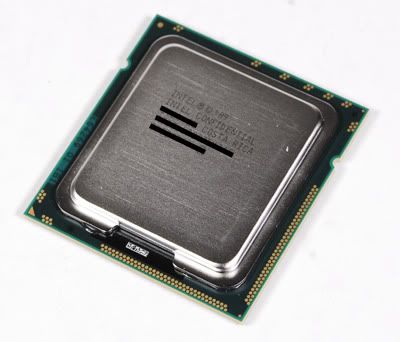
The new 6-core i7 looks the same like the 1st-gen i7 because it works on the same X58 boards

The new Gulftown 6-core i7 still works on the 1st-gen i7 boards, the X58, so your x58 with 1st-gen quad-core i7 can now be upgraded to the 3rd-gen hexa-core i7 with just a BIOS update.

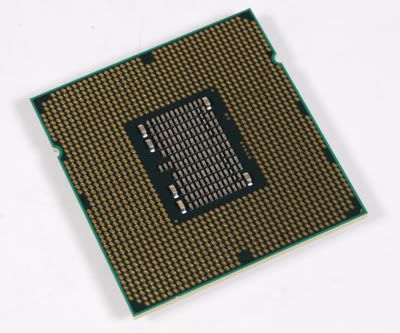
If you really must look under the skirt of the new 6-core i7, well, here it is

So that's basically the good news about this new 3rd-gen i7 6-core processor! The question would be just how much more power and performance does this 6-core offer over the quad-core? For a start, since the i7 processors come with Hyper-Threading, this makes the new 6-core i7 have 12 processing threads instead, as opposed to the current quad-core i7 having 8 threads capability. In other words, the new 6-core will seem to have 12 cores of processing.

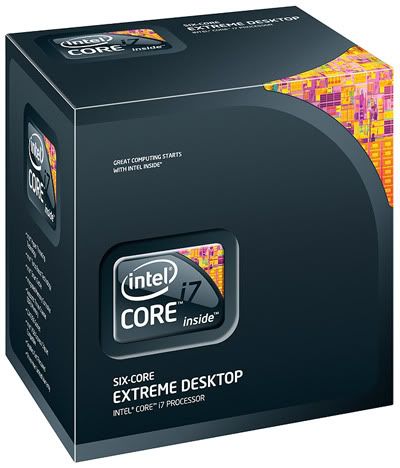
In case you're confused with all the 3 gens of i7 out there, the new Gulftown box says Six Core

We'll be running a few benchmarks to give you raw numbers so you can make the comparison for yourself, (yes, we know we STILL owe you Quadro gaming - we'll come to that when our jobs aren't killing us - start paying us and this site will turn into a full-time LEGO-tech-comic-etc.)

It's not a 1st and 2nd-gen quad-core i7 with just a dual-core inside, it's a whole new 6-core

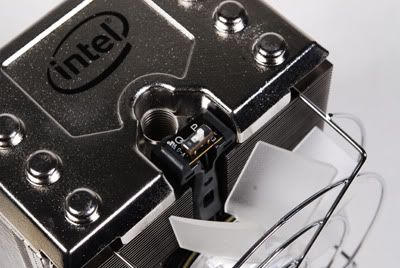
In the meantime, here are more pictures of the new 6-core i7, as well as Intel's new cooling fan (called the DBX-B Thermal Solution) which finally uses the car radiator design (which is better than the typical top-down cooling which only heats up the board instead). It even has a switch to toggle between fast and slow!

Octo copper heat-pipes from the copper base channel thermal accumulation into the aluminium heat-sink fins which then get cooled by the cooling fan to be blown out back of the computer casing via a hopefully-installed rear cooling fan. Checkout the quad screw system to fasten it on! Just a simple twist to secure the heat-sink in place! No more messy screwdrivers!

The top of the fan sports a toggle hardware switch so you can select between P (Performance @ 1800RPM) or Q (Quiet @ 800RPM) modes - for faster cooling but nosier, or quieter but slower cooling. Nice touch Intel!

Dow Corning TC-1996 Zinc Oxide thermal paste

Last but not least, the bundled thermal compound grease to be applied between the Gulftown and the new cooling fan is Dow Corning TC-1996 Zinc Oxide (grey). You can also get it here (USD15).

More Data?

Monday, March 1, 2010

Open Source = IlIegal Software?

That must have been some December...our Holiday Season dragged on to March...guess we must have had some Winter Blizzard...waiting for StarCraft2 :) Pun not intended for those who are actually experiencing blizzards!

Enough with the delays, it's time to continue with the Plot Monkey with another Random BrickTech comic!


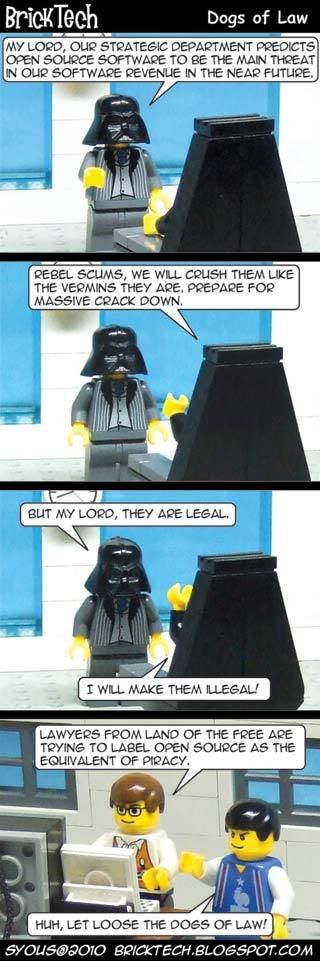
No seriously. We're not making it up. Why would we? See for yourself what happens when socialist ideas of Open Source Software (OSS) clashes with capitalist concepts of legal software:

When Using Open Source Makes You An Enemy Of The State

Oh, the whole Star Wars - Darth Vader - 'The Emperor' thing? We're sure you get the joke :)

More Data?

Tuesday, December 15, 2009

The Helium 3 Irony

Wow, Nanami Madobe, Microsoft's official Windows 7 OS-Tan (personification of an operating system, usually in the form of a virtual girl), has been on the front page of BrickTech for more than a month, as noticed by a reader in our Chat Box on our Sidebar:

Nene Anegasaki fan

Apparently Nene Anegasaki, another virtual girl, from the dating simultion game Love Plus, is more in demand than Nanami. She was mentioned over on BrickGamers.

Anyway, it's about time we solved this 'girl war', so we're finally updating BrickTech with a new comic! This comic is just giving a possible scenario due to recent news about the shortage of a certain element which is required to detect a certain type of bomb. So if we just think about it, some terrorists could use this advantage for their benefit. Mainly, we're talking about this...

BrickTech 10 - Helium 3 required to detect Nukes irony

Confused?
The US is developing a technology to detect smuggled uranium and plutonium, used to make nuclear bombs, but this machine requires Helium 3, and US is running out of this element. Talk about irony.

So why can't they just make Helium 3? Well, there's another problem. See, Helium 3 is formed when Tritium decays, but the US stopped making Tritium in 1989. This makes the demand for Helium 3 become 10x the supply.

If Tritium sounds familiar, it's because it's a by-product of Deuterium, and if THAT sounds familiar, then you must be Otaku or Geeky enough for BrickTech to know that Deuterium is used in the Star Trek universe for the Warp Core inside a Warp Drive used in Starships.

Tritium is also used in certain glow-in-the-dark products as Tritium is radioactive and well, glows. It's not found in your typical glow in the dark as those need light first before they glow.

Anyway, the US had planned to make up to 1,400 of these nuke bomb detectors, which costs USD800,000 each, for a total of 1.1billion dollars, to be placed in ports around the world so they can be detected in shipping containers before they enter the US.

Well all is not lost, they can actually rely on an older technology to detect these nuke bombs, but this older tech also has a problem of detecting cat litter as a nuke bomb too - seriously. Talk about toxic waste.

Source : New York Times

More Data?

Tuesday, November 3, 2009

Otaku-Friendly Windows 7

Official Microsoft Windows 7 Nanami Madobe OS-Tan wallpaper (background). If you want just this bg only (wide UXGA 2134 x 1200), you can get it here.

By now you would have heard of Windows 7, Microsoft's latest operating system, the 7th Windows release actually, which justifies them calling it Win7, when it's actually Windows 6.1. See our post here about it.

But did you know this is the first Windows to have an official OS-Tan by Microsoft and not by fans? Only in Japan for the first 7777 copies of Windows 7 Ultimate though. However, you can now get the Windows 7 OS-Tan Theme here on BrickTech to use on your non-Japan 7777 Windows 7. It might even work on Windows 6.0 (Vista) - give it a try!

Actually, it can work on ANY Windows if you just use the bundled wallpapers (or called background in Windows 7) and manually assign the OS-Tan voices to Windows events. But what is an OS-Tan?

OS-Tan is basically a personified OS, made popular by Japan, specifically for Windows, but it has now branched over into Apple's Macintosh OS, as well as Linux OS. They're usually all girls, to meet the fantasy of Otakus (Japanese geeks) of having an OS manifested as a human female.

In Resident Evil, the White Queen supercomputer is a young girl

In some ways they're the predecessor of science-fiction AI computers which can manifest themselves as a human, like the White Queen Computer from the Resident Evil series.

Apparently this is how Windows 7 looks like, and she's called Nanami Madobe, plus she looks VERY young.

To cater to this demand, Microsoft created an official Windows 7 character, Nanami Madobe, voiced by anime (Japanese animation) actress Nana Mizuki.

Nana Mizuki, the voice behind Windows 7

So, does that mean Windows 8 (or 9?) will have the ability to manifest itself as a holographic female personality? Well, we will have to wait and see! We can already expect the jokes of how a Windows AI will probably have mood swings to reflect if it has buggy codes within! ;p

More Data?

Thursday, October 29, 2009

Facebook Poke Crime

Facebook Poking Crime


Curious?

Yes, apparently to Poke someone on Facebook can be a crime after all, a virtual violation of private space it seems. In this case, the said person is supposed to keep their distance by court order, and we guess this includes virtual space as well! Will wonders never cease? Amazing!

Source : www.tennessean.com/article/20091008/MICRO060301/91008066/

More Data?

Monday, October 19, 2009

Windows 7 on Windows XP via Sun Virtual Box 3


A few months back we posted how you can run and try Windows 7 on your Windows XP desktop so you can decide if you want to switch to Windows 7 when it comes out a few days from now. You can read our previous entry here.

Now we continue by showing you how to actually go about doing this. We'll need to use a virtualisation software to emulate a virtual machine so it can run on top of your existing machine. Interested?

We're assuming you're running Windows XP, which is the most popular operating system (OS), and the likely candidate to migrate to Windows 7 - if you chose to do so. Of course, you can run virtualisation software on any other OS as well - as long the virtualisation software supports it.


We'll be using Sun's Virtual Box 3, since it's free, and unlike Microsoft's Virtual PC 6 Service Pack 1 (2007), which is also free, Sun's version offers a bit more. Of course there's popular VMware, but that's not free.

Keep in mind Microsoft's Virtual PC 7 only works on Windows 7 as XP Mode. We'll talk about that later on how to use XP software on Windows 7. Right now let's focus on Windows 7 on XP.

First you'll need to download Virtual Box, which can be found here (70MB). If you want to see the other options of Virtual Box, visit the site here. To get a primer about Virtual Box, go here.

Next, you'll need a copy of Windows 7 installation DVD, which you can get the free 3-months Enterprise edition here (x86 32-bit or x64 64-bit around 3GB). However, before you download the x64 version of Enterprise and find out you can't use it on your machine, first download and run this SecureAble tool (site here) to find out if your processor supports hardware x64 virtualisation. If your processor supports virtual x64, you'll get this:


If it doesn't, you'll get this:


So download the right Enterprise! The Enterprise edition is similiar to Windows 7 Ultimate (compare here), so you can try everything that Windows 7 has to offer.

Once you've used the Enterprise edition to evaluate Windows 7, you can then buy the full RTM edition when it goes on sale in the next few days. Okay, got your downloaded trial Enterprise edition burned into a DVD? It's time to start.


First, install the downloaded Virtual Box on your XP desktop. It will cut you off from the Internet while it installs its virtual networking hardware, so make sure you're not downloading anything! Once it's done, run the installed Virtual Box.

Now create a new virtual machine. Click the New button in Virtual Box and follow the wizard guide. Type a name for your virtual Windows 7 Enterprise (maybe Fake NCC1701? Okay, inside Trek joke - ignore!).

Select the type of OS you want to install on this virtual machine from the list - in this case, it'll be Windows. Then select the version of Windows - which is Windows 7. Next, select how much of your machine's memory you want to devote to this virtual Windows 7 - you can leave it as the default or increase it if you have more memory to spare.

If you're doing this on Windows XP, chances are it's the x86 (32-bit) version, so you'll be limited to 4GB of memory (if you have that much installed). This means you can't put more than 2GB for this virtual Windows 7 since that will leave your running Windows XP with less than 2GB of memory to run all else.

Next, you need to create a virtual hard drive to run this virtual Windows 7. This will lead you to the drive wizard. You can stick to the dynamically-expanding storage, this will grow the file space as needed based on your need for it. Next you'll need to also name this virtual drive. Again, you can stick to the initial size given or give your own size (and it will expand accordingly if you chose dynamic earlier).


Once all these are done you'll get a new entry in your list of virtual machines in the Virtual Box. It will be in a powered-off state. Now you'll have to power it on to install your Enterprise DVD.

Click on the Start button in Virtual Box and a new window will open as the virtual machine comes to life. Since it's your first time running this new virtual machine, another wizard will ask you for the source to install an OS to this new virtual machine. Just select your DVD drive. If you don't have the downloaded-and-burned Windows 7 Enterprise trial DVD in your drive, you'll get this:


If you do have the DVD in your drive, you'll get the the Windows 7 installation screen:


If you were so 'smart' to download and burn the x64 (64-bit) version of Enterprise but your processor can't run virtual x64 OS, then you'll get this:


Going back to the installation, so assuming all goes well, proceed with the user-friendly Windows 7 installation as if you were installing on an actual computer - even if you're doing it virtually. Remember that its installing on the virtual drive you configured earlier - so don't worry about it formatting your existing running Windows XP!

As the installation is running in its own virtual machine window, feel free to do something else on your Windows XP desktop while waiting for the installation to complete. When it's done, it'll automatically restart the virtual machine like it were a real computer.

That's all there is to it! Now you've got a virtual Windows 7 running on your existing Windows XP desktop! Feel free to run it anytime. You can do the same with the RTM Windows 7 when it's out a few days from now. Keep in mind this virtual Windows 7 is running off a virtual hardware, which means you can't install software drivers for the hardware that's on your real machine. You probably won't have to anyway - Windows 7 will automatically detect the virtual hardware.

Next, we'll show you how to share files between this virtual Windows 7 machine and your real Windows XP desktop.

More Data?

Sunday, October 4, 2009

.NET Games for Windows - LIVE version 3


This is a cross-post between BrickTech and BrickGamers to help gamers out who may be having problems with modern games which rely on Games for Windows - LIVE online service from Microsoft.

This online software service is integrated into games like Halo 2, Gears of War, Grand Theft Auto IV, Fallout 3, Warhammer 40,000 - Dawn of War II, Street Fighter IV, Batman - Arkham Asylum, Resident Evil 5, and so on. You can see the full list of Games for Windows - LIVE here. But did you know this is different from Games for Windows?


Games for Windows is a different set of games, which you can see the list here, but is categorised alphabetically. To see it as a whole page, go here.

To see an even bigger list, including upcoming games, and BOTH Games for Windows AND Games for Windows - LIVE games, check out this full list here.

So there's 2 types of Windows games? Sorta. You see, Microsoft, in order to "Get into the Game" so to speak, has ventured on a branding exercise to promote games which are designed for Windows with the "Games for Windows" moniker. The Games for Windows - LIVE is an enhancement which requires an online service component called Games for Windows - LIVE to be installed - even if you don't play that game online.


What this LIVE component does is enable linkage with you and other gamers who have the same such game installed - be it on the PC or Microsoft Xbox or Xbox 360 gaming console. Of course, if that said game doesn't support multi-player, then you can't play with others, but you can still link with them to see their scores, chat, etc.


The whole idea is to integrate Windows gamers with Xbox gamers, since in many places in the world, like Malaysia, Microsoft doesn't launch the Xbox here. This is due to rampant piracy and slow broadband, making Xbox LIVE online gaming service being not condusive for Microsoft. Their ultimate aim is to link up all users of Microsoft products to LIVE Anywhere. And please, no jokes about how if you reverse the word LIVE above it becomes EVIL :)


This Games for Windows - LIVE also ties up with their Windows LIVE online services, which the most popular being Windows LIVE Messenger, followed by Windows LIVE Mail. So what's this got to do with gamers?


Some Windows XP gamers are unaware the latest Games for Windows - LIVE, version 3 (30MB), requires Microsoft's .NET Framework software to be installed, with the latest being version 3.5 Service Pack 1 (200MB). Games for Windows - LIVE, version 2 (20MB), does not require .NET to be present. You can see what's new with version 3 here.

If you're having problems installing the MSI (Microsoft Installer) installation file of Games for Windows - LIVE version 2, your MSI might be outdated. You can get the latest version 4.5 here.

Going back to XP Games, so if you're having problems playing some of the new games on XP which need Games for Windows - LIVE, you can either install Games for Windows - LIVE version 2, or go for version 3 but you'll need .NET as well. Some of you may already have .NET for games like Sims 3 which need it. Of course, if you have Windows Vista or Windows 7, it comes with .NET already.

More Data?